AFC and SP in 6GHz spectrum on Cisco Catalyst WLC/AP.
The new 6GHz spectrum (1200MHz) offers brand new 59 x 20MHz wide channels (1 - 233). It has been operational in Wi-Fi 6E and Wi-Fi 7 standards.

The Federal Communications Commission (FCC) in the US allows the entire 6GHz spectrum with different power rules such as Standard Power (SP), and Low Power Indoor (LPI). The general power rules apply for the entire 6GHz band with different Power Spectral Density (PSD) maximums. The majority of regulatory domains differentiate between indoor and outdoor deployments.
Under Low Power Indoor (LPI) in the FCC domain the indoor Access Point (AP) can operate in the entire band and in all its segments U-NII-5, U-NII-6, U-NII-7, and U-NII-8 with max power 30dBm. The AP cannot exceed 5dBm/MHz which for 20MHz channel means no more than 18dBm power (40MHz <= 21dBm, 80MHz <= 24dBm, 160MHz <= 27dBm, 320MHz <= 30dBm). An AP in the LPI mode can only operate indoors and without external antennas or enclosures. The indoor APs operate at lower power levels, so they are less likely to interfere with the current 6GHz users (incumbents).
Under Standard Power (SP) in the FCC domain the indoor or outdoor APs can operate only in UNII-5, UNII-7 with a maximum PSD 23dBm (max 36dBm EIRP). Therefore, the higher AP power levels have a higher probability of interfering with current 6GHz users (incumbents). The AP power is regulated since it knows if it is deployed indoors or outdoors. Consequently, the STA (client's device) that is connected to it must obey its rules to operate either in LPI or SP mode. The STA power limit is 6dBm below the AP's maximum.
The outdoor system incumbents are either fixed or mobile communication systems. Most fixed systems (such as P2P radio links, earth to low orbit satellite links - fixed satellite services, safety dispatch to cell tower backhauls) operate in UNII-5 and UNII-7 bands. On the other hand, there are mobile systems (such as TV news trucks) that operate in the UNII-6 and UNII-8 bands. Since the mobile systems are frequently moving tracking them would be challenging. So, the logical conclusion was the FCC to allow the indoor and outdoor at the SP level only in U-NII-5 and U-NII-7 bands per channel and power level based on the AP's geographical location.
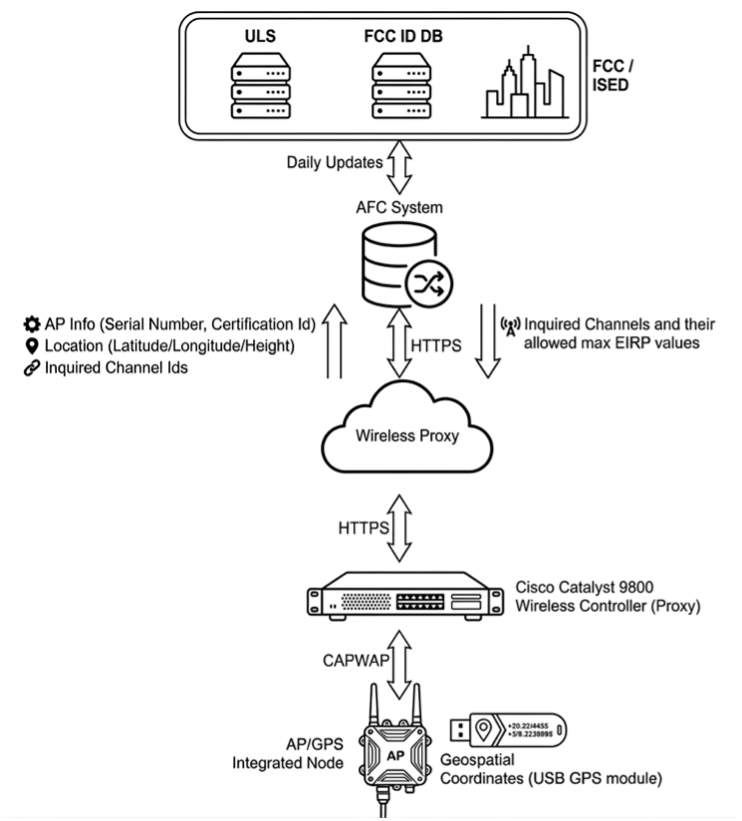
This verification system with databases and management processes is called Automated Frequency Coordination (AFC). Under this verification system, fixed incumbents (in U-NII-5 and U-NII-7 bands) can register any new system (location, transmitter, receiver, frequency, bandwidth, antenna height, and transmitted EIRP) or submit any changes to its system with the FCC's Universal Licensing System (ULS). The use of 6 GHz spectrum for unlicensed Wi-Fi with Standard Power requires AFC. The Cisco AP must access registered AFC systems (FCC database, FCC ULS, and Cisco WLC C9800 as an AFC proxy) to ensure that it will not cause any interference to the current 6GHz licensed devices/services (incumbents).
Before enabling Standard Power, the AP must register with the AFC system where the AFC proxy sends the AP information to the AFC system. The AFC system calculates the available frequencies and maximum power levels allowed in each frequency range based on the information in the FCC database. The response from the AFC is sent back to the WLC whether will authorize the AP for outdoor or Standard Power use in 6GHz Wi-Fi deployments.
As per FCC regulations, the WLC must inquire every 24 hours with the AFC system to find out which channels are available for use at the specific geolocation area. For the Cisco AP (managed by the WLC C9800) to send a request to the AFC system, it must have connectivity to the cloud. In the WLC C9800 case, the firewall must allow traffic to two URLs (dnaservices.cisco.com on port 443 and commercial.oscp.identrust.com on port 80) and have configured HTTP Proxy (sysproxy.domain-name:8080) on port 80 in the WLC under Configuration>Services>Cloud Services>DNA Services.
The Standard AP request usually includes Geolocation, Antenna Height Above Ground level, Height Uncertainty, FCC ID, and Device's Serial Number. To use Standard Power in the 6GHz you must enable the Standard Power Service for AFC under Configuration>Tag & Profiles>RF/Radio>RF in the RF Profile.
 After, enabling it in the RF profile the AFC status could be verified in the WLC's C9800 GUI under:
Monitoring>Wireless>AP Statistics>AP Name>General>AFC.
The AP must obtain geological coordinates using its built in or external Global Navigational Satellite System (GNSS) module to compute GPS location (for example in the US), constellation, orientation, and time. The AP must have a clear line of sight to the sky, usually near windows to acquire a satellite signal. It is recommended to have a few APs with GNSS module deployed strategically by the windows just in case that one of the GNSS APs drops its connection to the GPS satellites. Therefore, if at least one AP has a GPS signal the other APs connected to the same Cisco WLC C9800 can leverage the GPS coordinates with relative measure of uncertainty.
This "geolocation propagation" can be accomplished through wired proximity (CDP/LLPD table) on the same Layer 2 network
or via shared RF neighbors up to 400 meters from the AP with a GPS signal. Wireless propagation allows APs to see a GNSS AP as its neighbor when they
hear its beacon frames and NDP messages. The GNSS AP should have sight of at least four satellites however for better accuracy six to eight satellites
are recommended. To enable AFC on the GNSS APs in C9800 WLC the admin must declare in the Access Point configuration under
Configuration>Wireless>Access Points>Geolocation
the AP's Height Above Ground and Height Uncertainty (both in meters).
Then, after about 15 minutes we should be able to see how the AP obtained the GPS coordinates in the "Geolocation Source"
either via GNSS or Derived from other GNSS neighbor AP. In the GUI of WLC C9800 under
Monitoring>General>AP Name>360 View>Geolocation information link.
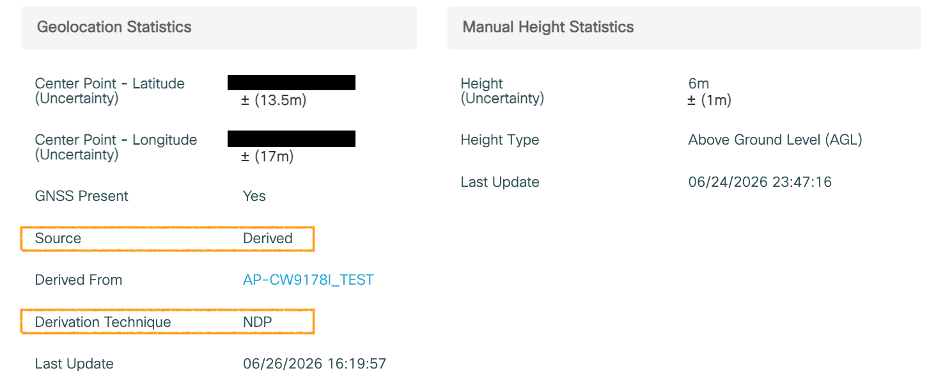 AFC Source: Derivation Technique: NDP
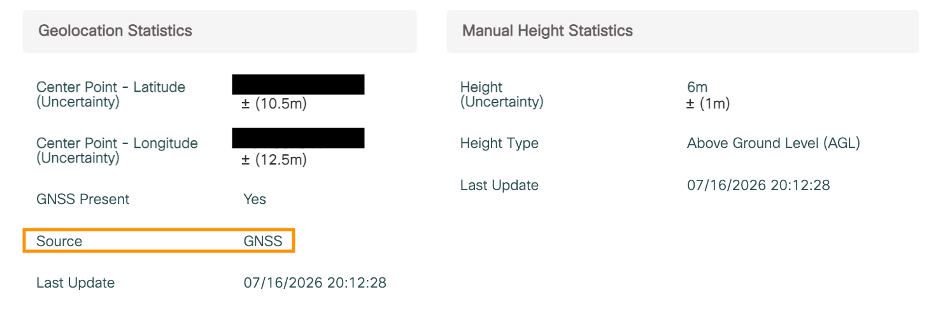 AFC Source: GNSS
After login to the Cisco's CLI of the AP CW9100s, use the command "show gnss info" to see the number of satellites, the constellation, position, and signal strength of the GNSS AP.
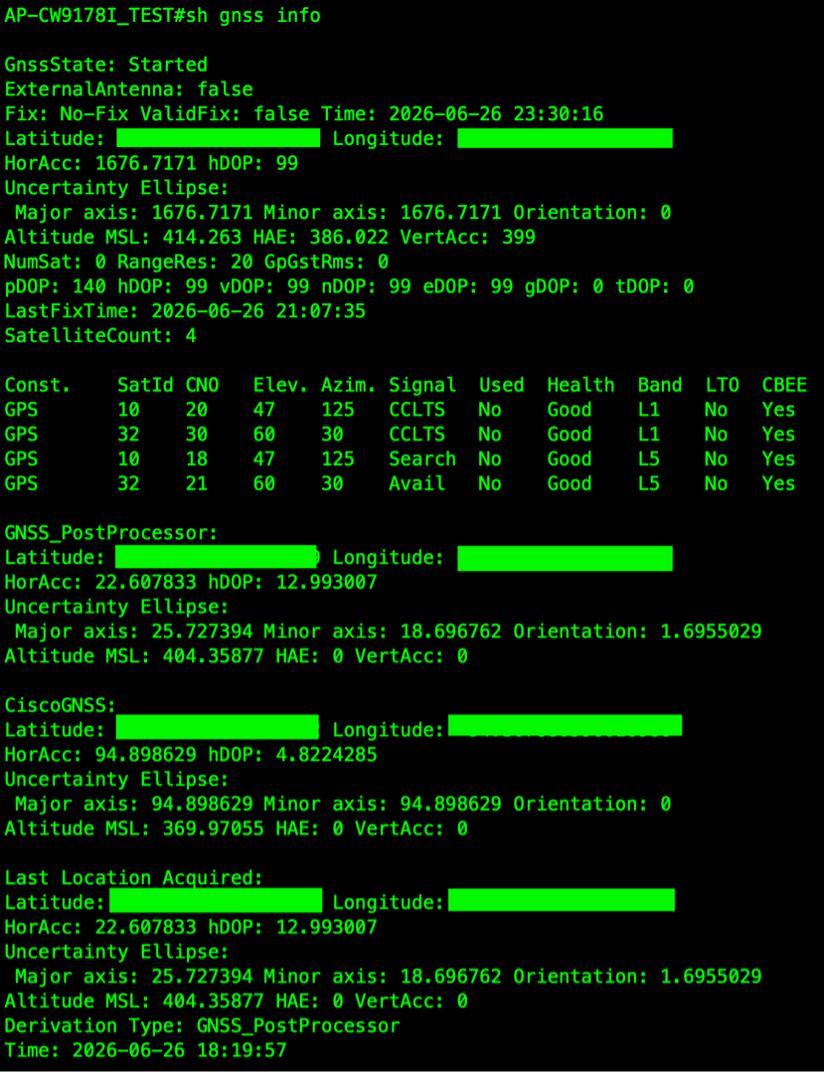
To see information about AFC in CLI of the WLC C9800 use commands:
"show wireless afc geolocation"
"show wireless afc statistics"
"show ap geolocation summary"
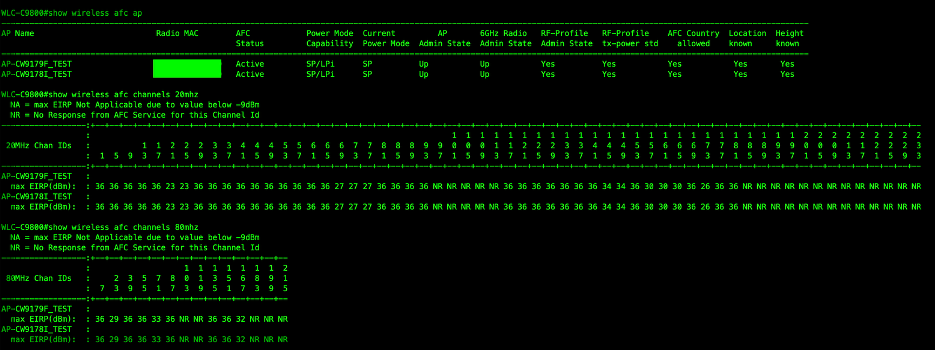
"show wireless afc ap"
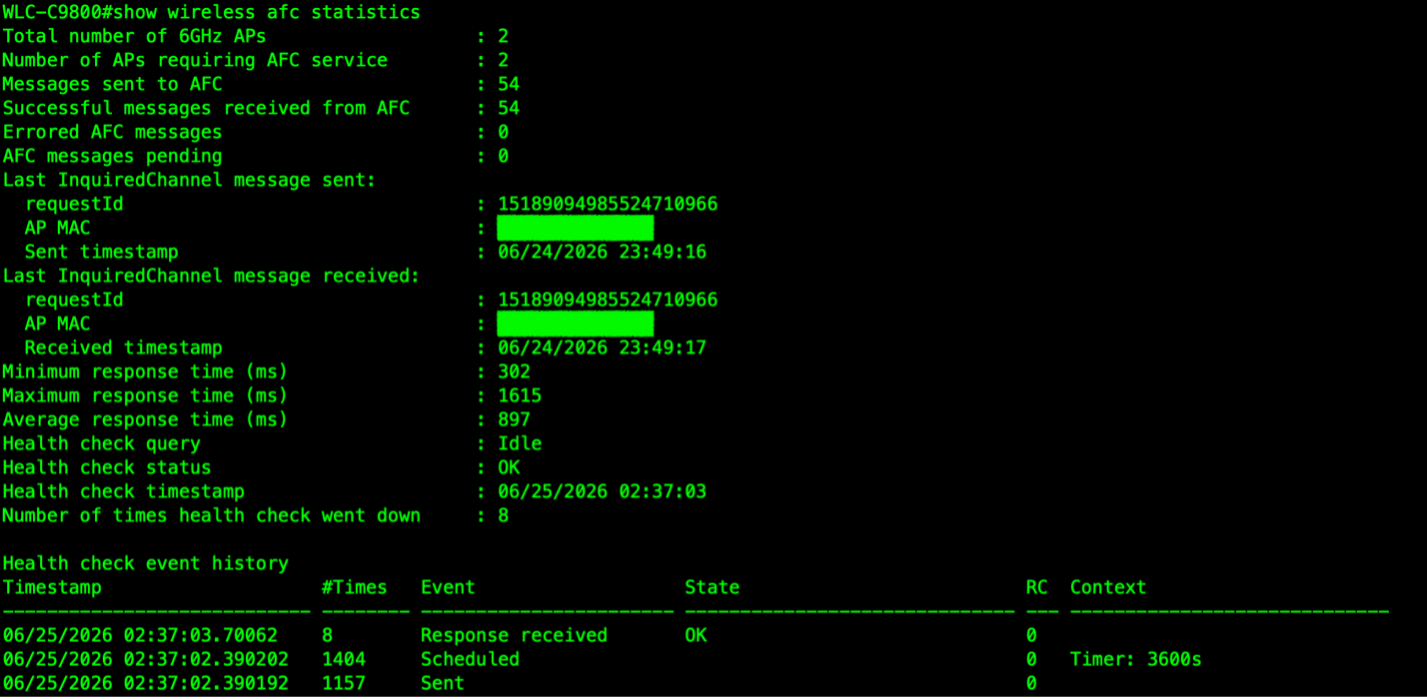
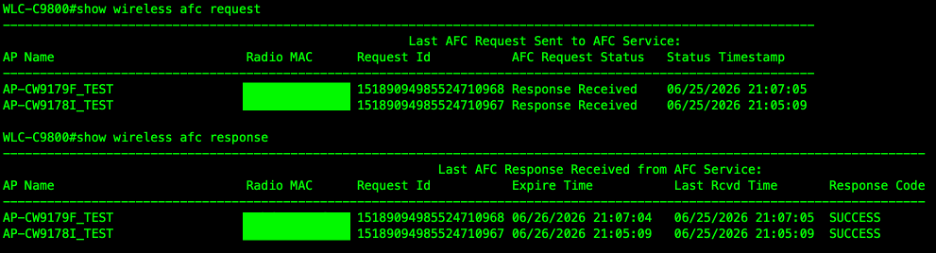
To verify whether the AP is communicating with the AFC system regarding Standard Power mode, you can use the following CLI commands to monitor the status of requests and responses:
"show wireless afc request"
"show wireless afc response"
After the AP has been granted the Standard Power, you can verify the AFC channels and power levels in the WLC by using CLI command "show wireless afc channels 20/40/80/160mhz".
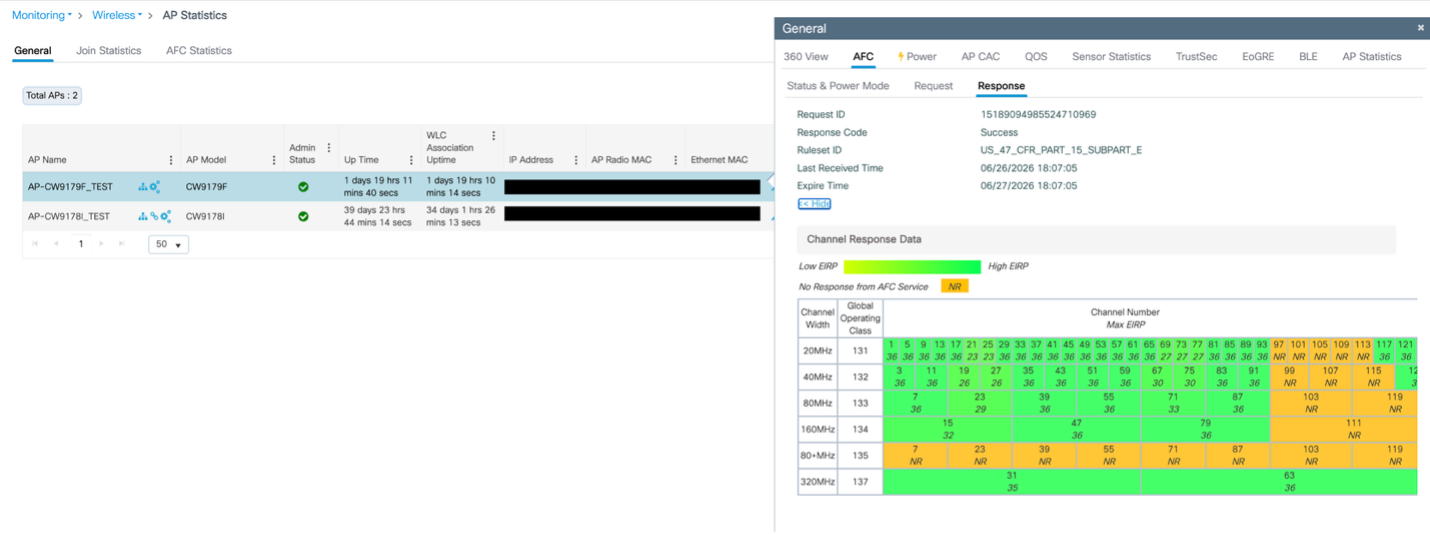 The same information about available channels and power levels is available in the WLC's GUI under
Monitoring>Wireless>AP Statistics>AP Name>General>AFC>Response.
Then based on this information, a network administrator can configure the AP's channel and Standard Power levels manually or let the RRM (Radio Resource Manager) algorithm allocate these settings automatically.
When configuring the channels and power manually on Cisco AP CW9100s, you should check after 24 hours if there was any change in power/channel settings because some of the APs could be back in default on the LPI settings. Then you will have to switch back the AP's channel/power configuration to global settings. After a few minutes, the AP's channel and power can be configured manually with SP settings again.
Resources:

Comments: