Three-phase wireless design for high-density environments.
Building a wireless project requires the same disciplined process as any other network deployment. Usually it is composed of three phases: designing the network, implementing the network and validating/operating the network. These phases can be applied to any scale of a project from the smallest to the largest one. As part of a network team that designs, deploys, and supports corporate events, meetings, and trainings in convention centers and hotels across the country, I habitually go through these three phases every time a new or reoccurring event happens.
The design phase usually involves several steps such as meeting with the customer, which in our case is always a shows and events team that determines the network requirements they have for specific areas in a contracted convention center, resort or hotel. Usually, this phase requires doing predictive wireless surveys to see the RF environment before deployment. However, because we occupy most of the venue, convention centers and hotels typically disable their non-essential 5GHz channels for us. Besides, they primarily utilize the 2.4GHz spectrum for their IoT devices that run HVAC and lights. If needed I perform a walkthrough for measurements of areas that are not typically documented, for example a theater's stepping level heights. After that I meet with the production team that deploys and supports audio and video for the event and ask for any scaled drawings with detailed layouts. For example, if there are going to be any trusses deployed, I would need their heights (typically 20-30 feet high) and lengths, placements of the stage and screens, and the attendees seating layout with the exact number of seats per section. These meeting areas could be setup for a few hundred to several thousand attendees.
There are always several different breakout rooms, ballrooms, or halls. Each set up is for different purposes. One of the exhibit halls is always setup as a general session with about 7,000 seats for opening and closing session. Then there are typically 2-3 ballrooms with about 2,000 seats each, dozens of breakout rooms that usually holds between 200-400 attendees each, and finally 3-4 exhibit halls that cover about 400,000 square feet area, which is the setup in expos or trade shows with up to 7,000 attendees in the area at any given time. We usually share the trusses with production companies to do aerial deployment of our access points with directional antennas.
The majority of Wi-Fi coverage areas require three SSIDs such as Corporate (802.1X/RADIUS), Guest (open, OWE), and Production (PSK, SAE) where we utilize a Split Tunneling model. The supplicants on all the corporate devices such as Windows/MacBook laptops (3x3 or 2x2 MIMO) must be authenticated with the RADIUS (ISE) server to be able connect to the corporate network via DMVPN or MPLS. However, all the attendees' smartphones/tablets (2x2 or 1x1 MIMO) are usually connecting to the open SSID to get to the Internet through local ISP. Since the majority of areas are high density environments, we have eliminated 2.4GHz band deployment and focus only on 5GHz and the newest 6GHz band for deployments to provide Wi-Fi high-density coverage. We typically get a power source on the trusses to power up our access switches with POE++, so we don't have to run long copper cables for the APs especially because we use shielded copper cables (to eliminate EMI from LED screens and production's power cables) that are heavier and harder to work with. If for some reason we cannot utilize trusses in these areas, we deploy APs on tripods that are about 10 feet height. I typically create wireless deployment designs by using Ekahau AI Pro, and if there is an area that has different levels and heights such as theater, bleachers or an actual stadium arena, then I utilize Hamina Network Planner for a 3D design.
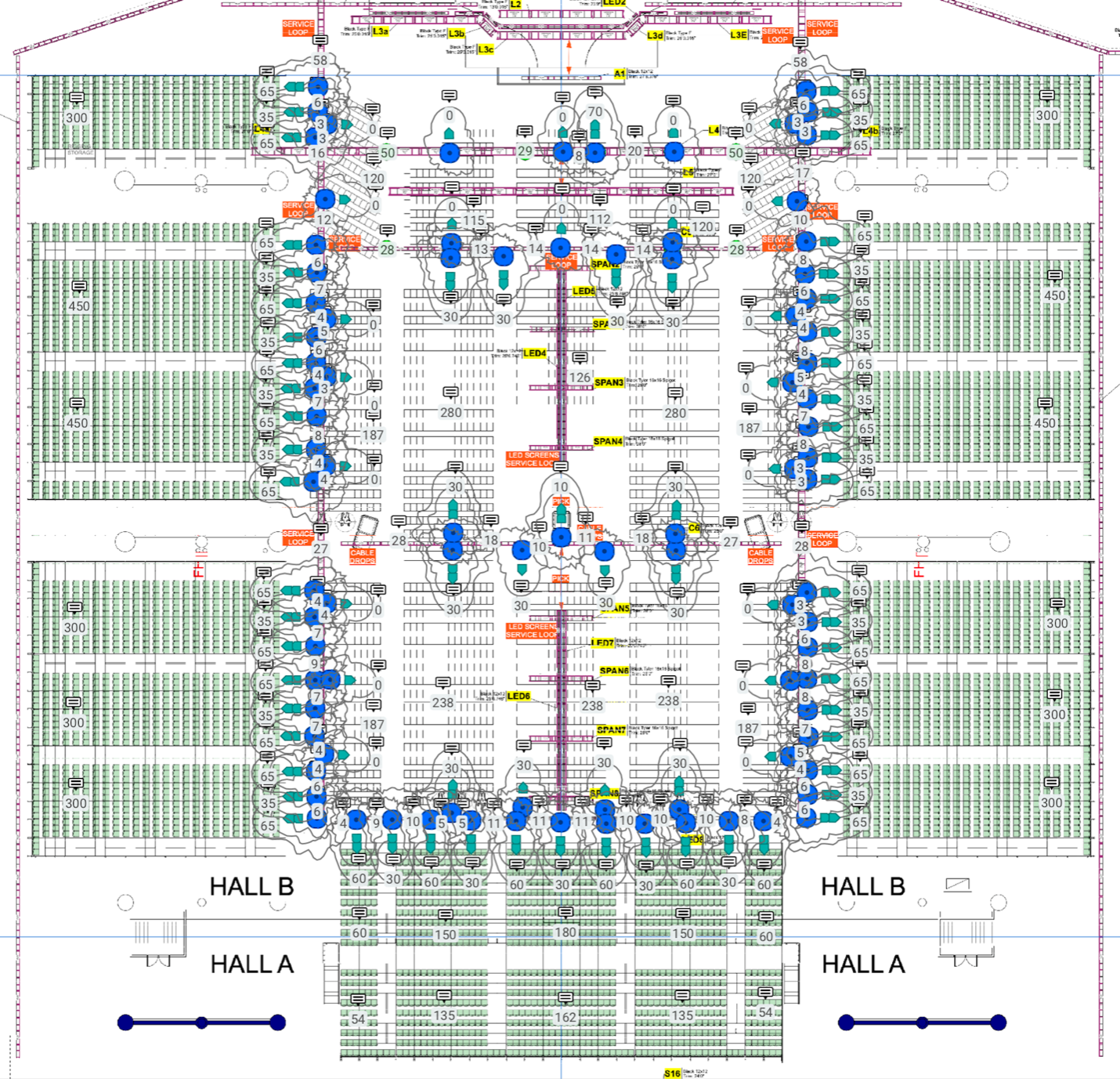 An example of wireless design for General Session (bleachers seating in green) with trusses for an aerial deployment of APs (with distances in feet and antennas angles in degrees).
Since we reuse the same network equipment (routers, switches, access points, WLCs) over again from one event to another, we generally don't create BOM (Bill of Materials). In addition, I usually create detailed wireless designs with location, distances, heights, and antenna angles. Generally, I design Wi-Fi coverage with 50 clients per radio. If the AP has two 5GHz and one 6GHz antenna (for example Cisco CW9179F), then I can estimate about 150 clients per AP. I use this number to determine how many APs I would need to have Wi-Fi coverage in specific high-density settings. By setting the 6GHz radio power to 3dBm higher than the 5GHz radios, it can evenly split the clients between the two bands. This helps to reduce overutilization of the channels and with less contention and more airtime efficiency in both 5 and 6GHz bands.
In the implementation phase, I usually lead the deployment of switches and APs with directional antennas on the trusses with assistance from a couple other network engineers and a small group of cable technicians. After we mount all the equipment, I use a laser angle finder tool to make sure that our antennas have the correct angles as planned with Ekahau or Hamina design software and are not obstructed by any other audio/video equipment that wasn't noted in the original layout. Before the production raises the trusses to the final performing height, we usually bring the APs online for the functionality testing because it is much easier to replace a faulty or damaged copper cable with RJ45 connector when the trusses are at a working height of 4 feet off the ground.
The final validation phase (optimization/operation) comes when the production company raises all the trusses through the venue and all the attendees' chairs are placed in position. Meanwhile, I configure the APs (channels and TCP) via the WLC's GUI/CLI or depending on the size of the deployment, I will let the RRM algorithm to do its job. Just in case I always check the RRM settings because I have seen numerous conflicts in channel placements through the years of utilizing automation algorithms. For the post deployment validation survey, I use Ekahau or Hamina site survey software to see if the APs with antennas are pointed at the right coverage locations and are broadcasting on the planned channels and power levels based on the heat map measurements.
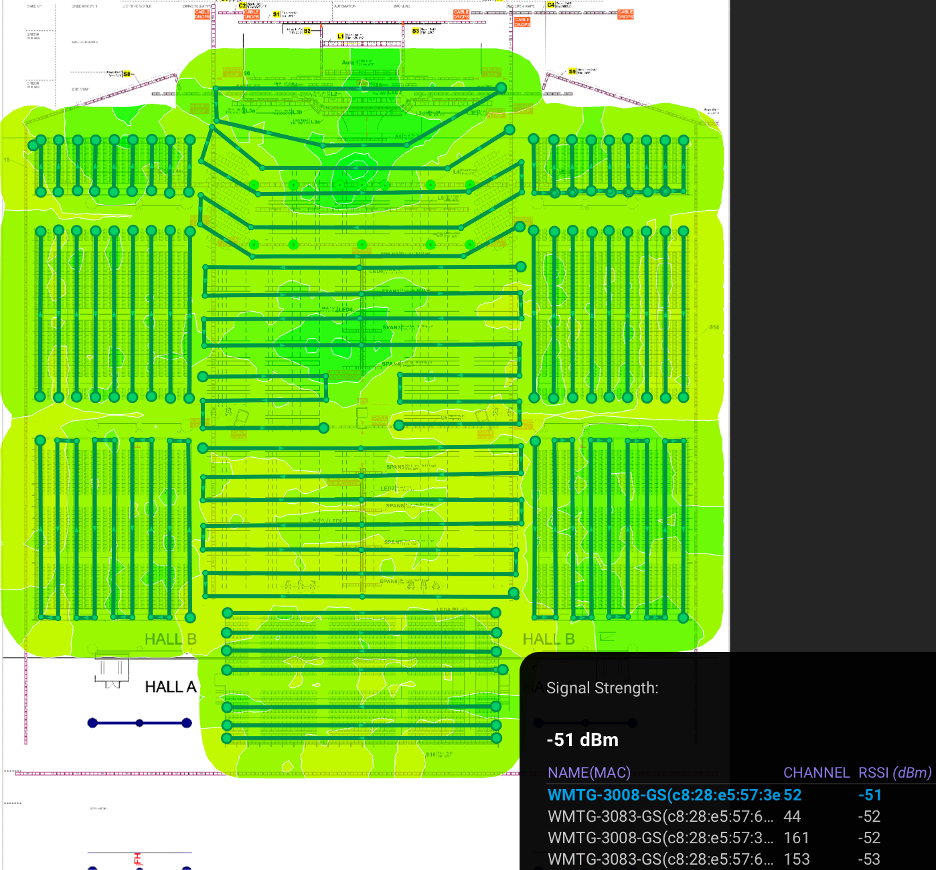 An example of post deployment validation wireless survey from the same General Session with an aerial APs deployment on trusses.
While doing surveys I also do a quick spectrum check of the venue with a Spectrum Analyzer to see if there are any wireless routers or APs that are not authorized to broadcast in the area. If necessary, I normally locate these offenders with NetAlly Aircheck G3 or Etherscope nXG. Because there are thousands of clients' devices to support there must be an adequate number of access points deployed on 20MHz wide channels. Therefore, channel reuse must be carefully planned especially in the 5 GHz spectrum where there is only 25 non-overlapping channels. Additionally, I do validation testing at random coverage areas with Windows/MacBook laptops and smartphones/tablets to see their RSSI, SNR values in both 5 and 6GHz bands. This testing is crucial to see if the measured values are similar to the predicted values from the wireless designs. At this stage usually the only adjustments and optimization that are feasible to do are changes in the AP's channels, TPC or RxSOP values.
Therefore, this three-phase process is crucial for consistent results from venue to venue. Also, documenting plays an essential role to be able to learn from it and reuse specific measurements and processes if needed in the future high-density deployments.

Comments: